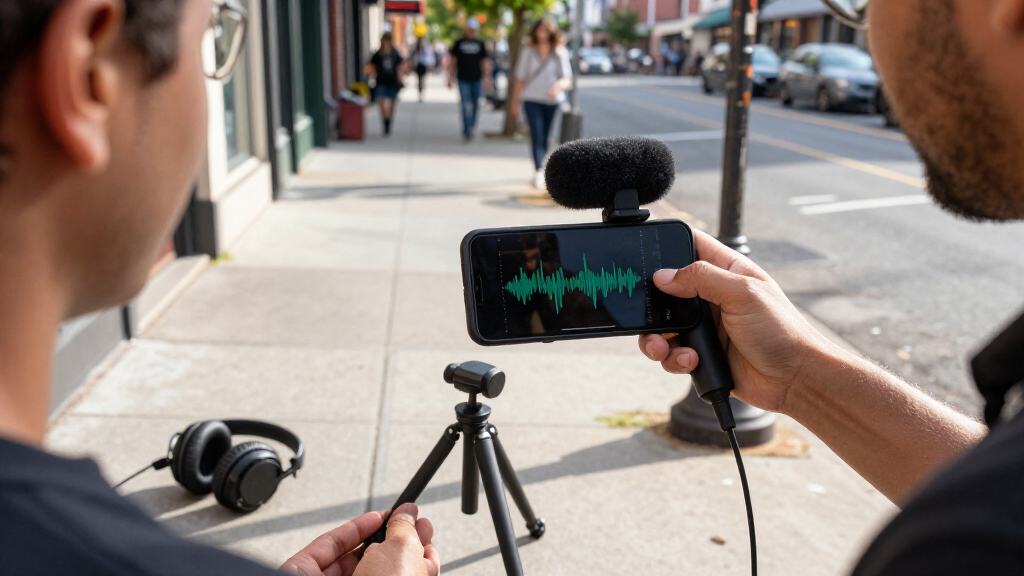

This checklist is for mobile journalists building a phone-based setup for interviews, reporting, and video. It covers six accessory slots, from mounting and stabilization to lighting, prompting, and audio connections.

Get everyday essentials delivered free with Prime
- Fast, free delivery on millions of items
- Prime Video, Amazon Music and more included
- Member-only deals all year
The sections are organized by what each accessory does: rig, microphone, light, teleprompter, audio interface, and gimbal. Each one names a pick and offers practical points to check against your phone, recording setup, and working style.
Use the checklist to confirm compatibility first, then decide which slot addresses your biggest reporting need. Check the product details for supported devices, connections, included components, and setup requirements before you buy.
Smartphone Video Rig
A smartphone video rig gives you a place to organize the parts of a mobile reporting setup around the phone. The pick here is the SmallRig x Brandon Li All-in-One Mobile Video Kit. Before choosing a kit, make sure its configuration suits how you actually report: a setup for a stationary interview may differ from one you carry between locations or operate while moving.
A common buying mistake is treating “all-in-one” as proof that every needed component is included or compatible. Check the exact contents and confirm how the kit attaches to your particular phone, including any case you plan to keep on. Look at where accessories can be mounted and whether those positions leave room for your other equipment, such as a microphone receiver or light. Consider how quickly you can assemble and adjust the rig when a reporting opportunity is brief.
Fit also involves handling: think about whether the assembled setup feels manageable for your typical recording session and whether controls remain accessible. Verify the phone’s dimensions and attachment requirements against the manufacturer’s specifications. A kit only earns its place when it supports your actual workflow, so compare its layout with the accessories you already own before committing.
What to look for:
- Confirm phone and case fit in the specified mounting range.
- Check which rig components are included in the package.
- Look for mounting positions that suit your planned accessories.
- Verify that phone controls and ports remain accessible.
- Consider how the setup fits your reporting and carrying routine.
SmallRig x Brandon Li All-in-One Mobile Video Kit

The SmallRig x Brandon Li All-in-One Mobile Video Kit is a comprehensive setup for professional smartphone videography. It includes a universal phone cage, wireless remote, M.2 SSD enclosure, 67mm VND filter, USB-C docking station, power bank holder, and accessories for versatile filming with various mobile devices.
Pros:
- Versatile all-in-one kit suitable for professional mobile videography
- Supports a wide range of mobile phones and accessories
- Includes advanced features like wireless remote control and magnetic VND filter
Cons:
- Requires careful handling to avoid interference when using MagSafe with filter system
- Some features may need adjustment for specific phone models (e.g., iPhone 16 Pro Max)
- Complex setup may be challenging for beginners
Best for: reporters organizing phone-mounted accessories in one setup
Not ideal for: buyers who have not checked device fit or included components
Bottom line: Choose the kit after confirming it fits your phone and gives your accessories usable mounting positions.
Wireless Lavalier Microphone
A wireless lavalier system can be useful when an interview subject needs a small microphone while the phone or camera stays elsewhere. This checklist’s pick is the Shure BLX14/CVL Wireless Lavalier Microphone System, H10 Band. Its place in your kit depends on how you capture audio and what connections your recording device supports.
One easy mistake is assuming a wireless receiver connects directly to every smartphone. Verify the full signal path: identify the receiver’s output, the phone’s input, and any adapter or interface needed between them. Check whether your recording app can use that input and whether you can monitor or confirm the signal during setup. Don’t infer range, battery life, or included accessories from the product name; consult the manufacturer’s specifications for the exact system and package.
Think about fit in both senses: whether the lavalier can be placed comfortably on the speaker and whether the receiver works with your phone rig. If you report with different phones, check each device separately, including its connector and case clearance. For interviews, practice attaching the microphone and making a short recording before relying on the setup. That quick check can reveal connection or placement issues while there is still time to adjust.
What to look for:
- Confirm the H10 band is appropriate for your location and use.
- Check receiver output against your phone or interface input.
- Identify any required adapters and confirm app input support.
- Review the package contents and power requirements.
- Plan microphone placement and a way to check recorded audio.
Shure BLX14/CVL Wireless Lavalier Microphone System, H10 Band

This wireless lavalier system includes a single-channel receiver, bodypack transmitter, and cardioid clip-on microphone with windscreen for hands-free speech capture. It provides up to 300 ft (100 m) of line-of-sight range and up to 14 hours of operation on two AA batteries under typical conditions.
Pros:
- Includes the receiver, transmitter, and lavalier microphone for a complete setup
- Up to 14 hours of operation on two AA batteries
- Hands-free microphone with discreet clip-on placement
- Supports up to 12 compatible systems per band
Cons:
- The listed UHF frequency band may not be authorized in every region
- The stated range is line-of-sight and based on typical conditions
Best for: reporters recording interviews with a wireless lavalier setup
Not ideal for: phone users who have not confirmed the receiver connection path
Bottom line: Check band, connections, and phone input support before building this system into your reporting kit.
Portable LED Video Light
Lighting is one part of a mobile video setup that may need to change with the location and the way you frame a subject. The named pick is the NEEWER MS150B 130W Bi-Color COB LED Video Light. Before selecting it for field work, consider where it will be placed, how it will be powered, and whether its setup suits the spaces where you report.
A frequent mistake is choosing a light from its name alone without checking its dimensions, mounting options, power requirements, or what comes in the box. Check the complete setup against your planned camera position: confirm the light can be supported where you intend to use it and that its power arrangement fits your recording locations. Review the manufacturer’s specifications for adjustment range and controls, then consider whether you can reach them once the light is positioned.
For fit, account for the phone rig, any stand or support, and room for the subject and operator. Avoid assuming that a light can attach directly to your rig or that a particular modifier is included. If you expect to move between locations, consider how the light and its required accessories fit into your carrying setup. A brief setup rehearsal in a representative location can help you judge whether the arrangement is practical before a reporting assignment.
What to look for:
- Confirm power requirements and available power options.
- Check mounting and support requirements for your planned location.
- Review included components and any separately needed accessories.
- Verify how light settings are adjusted once positioned.
- Consider the light’s size and carrying needs with your phone rig.
NEEWER MS150B 130W Bi-Color COB LED Video Light

The portable 130W bi-color LED light offers adjustable 2700K–6500K color temperature, 0–100% dimming, and 12 lighting effects. It supports app and 2.4G group control, multiple battery or AC power options, and Bowens-mount light modifiers.
Pros:
- Wide adjustable color-temperature and dimming ranges
- App and 2.4G group control
- Supports AC and multiple battery power options
- Includes a Bowens mount adapter
Cons:
- Batteries are not included
- NP-F batteries limit maximum output to 44W
- Batteries cannot charge while the light is in use
Best for: journalists planning a dedicated light in their video kit
Not ideal for: reporters who need a setup without checking power and support needs
Bottom line: Confirm power, mounting, and package contents against the locations where you plan to record.
Smartphone Teleprompter
A teleprompter can help when a mobile journalist needs to deliver prepared lines while addressing the camera. The pick listed here is the Elgato Prompter with Built-in Screen and 1080p Full HD Resolution. Before adding it to a phone workflow, establish exactly how your phone will fit into the arrangement and how the script will be displayed and controlled.
Do not assume that a product described as a smartphone teleprompter will work with every phone, camera app, or mounting arrangement. Check device compatibility, the supported phone dimensions, connection needs, and the manufacturer’s instructions for displaying or controlling text. Confirm whether your intended recording device can be positioned as required and whether the prompter’s screen arrangement suits the way you frame yourself. Check which cables, mounts, or other pieces are included rather than inferring them from the product name.
Fit is especially important for a setup that combines a phone, prompter, and support. Confirm that the assembled equipment can be placed at the distance and height you need, and that your phone’s camera and controls remain usable. If you plan to read while recording, rehearse with your actual script and recording app. That helps you assess whether the text display, framing, and operating steps work together for your delivery style.
What to look for:
- Verify phone dimensions and supported device arrangements.
- Check how scripts are displayed and controlled.
- Confirm recording app and connection requirements.
- Review included mounts, cables, and other components.
- Rehearse framing and script readability with your phone.
Elgato Prompter with Built-in Screen and 1080p Full HD Resolution
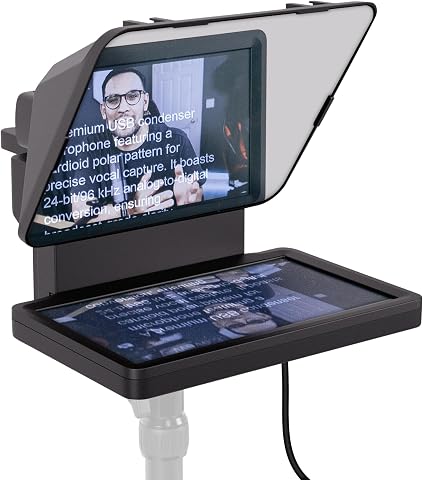
The Elgato Prompter features a built-in display that allows you to read scripts or chat messages without additional devices. It supports various cameras, is easy to set up, and helps maintain eye contact during video calls or streaming.
Pros:
- Built-in display eliminates the need for extra tablets or smartphones
- Supports a wide range of cameras, including wide lenses
- Easy to set up and control via PC or Mac
Cons:
- DisplayLink software required on Mac and Android devices
- No mobile app control, may limit flexibility for some users
Best for: reporters who regularly deliver prepared lines to camera
Not ideal for: buyers who have not confirmed phone fit and recording workflow
Bottom line: Confirm device support and rehearse the full phone, prompt, and recording arrangement before choosing it.
USB-C Audio Interface
An audio interface belongs on a checklist when a reporting setup needs to connect microphones or other audio equipment to a USB-C recording device. The listed pick is the Icon Pro Audio Harrison 32Ci Analog Mic Preamps with 12-channel USB C. Since product names alone do not establish how it fits a specific phone workflow, begin by checking the manufacturer’s connection and device requirements.
A common mistake is seeing “USB C” and assuming direct compatibility with any phone, app, or microphone. Trace every connection: confirm the interface’s host requirements, the phone’s support for the intended USB audio device, and whether any power, cable, or adapter is required. Check the actual inputs and channel configuration against the microphones you plan to use. The product name references analog mic preamps and 12-channel USB C; use the product documentation to understand the available connections and supported operating modes.
For physical fit, consider where the interface will sit relative to the phone, microphones, and operator. Verify that your intended recording app can select and use it, and that you have a practical way to monitor levels or confirm the recording. If your reporting kit is phone-first, test the complete chain with the exact phone and microphone before relying on it in the field. Compatibility is a system question, not something a connector label settles on its own.
What to look for:
- Confirm USB audio support on the exact phone and operating system.
- Check host power needs, cables, and adapter requirements.
- Match available inputs to the microphones you plan to connect.
- Verify recording app support and monitoring options.
- Review the product documentation for channel and operating details.
Icon Pro Audio Harrison 32Ci Analog Mic Preamps with 12-channel USB C Audio Inte

The Harrison 32Ci is a professional 12-channel USB audio interface featuring legendary Harrison 32C preamps known for warm, transparent sound. It offers studio-grade performance with high-gain capacity, innovative filters, and seamless control for music production and recording.
Pros:
- High-quality Harrison 32C preamps for warm, transparent sound
- Studio-grade performance with broad frequency response
- Revolutionary filters and high-gain capacity for versatile recording
Cons:
- Requires compatible DAW software and setup knowledge
- Limited to USB connectivity, no other I/O options mentioned
Best for: reporters connecting multiple audio sources to a USB-C setup
Not ideal for: phone users who have not checked host power and app support
Bottom line: Verify phone, app, power, and microphone compatibility as a complete signal chain.
Phone Gimbal Stabilizer
A phone gimbal can support a mobile video workflow when your reporting calls for a stabilized handheld setup. The named choice is the Hohem iSteady M7 Gimbal Stabilizer for Smartphones with Magnetic AI Tr. The product name is truncated, so check the complete listing and manufacturer documentation before deciding what features or components are included.
A common mistake is assuming every phone will balance on every gimbal, especially with a case or accessories attached. Check the supported phone dimensions and weight, then account for your actual case and any mounted microphone or light. Confirm the gimbal’s operating and charging requirements, how its controls work with your phone, and what the referenced magnetic AI feature means in the full product documentation. Do not rely on a partial name to establish tracking modes or compatibility.
Fit includes balance and access: make sure the phone can be positioned as needed, that buttons and ports remain usable, and that your intended accessories do not interfere with movement. Review the manufacturer’s guidance for supported apps and phone systems if you plan to use app-based controls. Before reporting with it, practice balancing the phone and using the controls with your normal setup. A gimbal that fits the bare phone may not suit a rigged phone, so assess the complete configuration you intend to carry.
What to look for:
- Find the complete product name and current specifications.
- Check phone size and weight limits with your case attached.
- Confirm whether accessories affect balance or movement.
- Verify app, operating system, and control compatibility.
- Review charging, setup, and included component details.
Hohem iSteady M7 Gimbal Stabilizer for Smartphones with Magnetic AI Tracker, Fil

The Hohem iSteady M7 is a versatile smartphone gimbal stabilizer featuring magnetic AI tracking, a detachable touchscreen remote, built-in extension rod, and customizable fill light. It supports up to 500g payload, making it suitable for capturing smooth, professional-quality videos and photos in various environments.
Pros:
- Advanced magnetic AI tracking for precise subject recognition
- Detachable full-color touchscreen remote for easy control from a distance
- Built-in extension rod for creative high or low-angle shots
- Customizable fill light enhances low-light filming
Cons:
- Relatively heavy at 500g, may be less portable for some users
- Complex setup with multiple accessories might be overwhelming for beginners
- Limited to smartphones up to 500g payload, not suitable for larger devices
Best for: reporters seeking a gimbal for compatible smartphone video
Not ideal for: buyers relying on the truncated name without checking specifications
Bottom line: Confirm the full model details and balance limits with your actual phone and accessories.
For a budget-first buying order, start with the slot that solves your most frequent reporting problem, then confirm the phone and connection requirements before expanding. A microphone may be the priority for interviews; a rig, light, teleprompter, interface, or gimbal may matter more for a different workflow. Compare the complete setup requirements before buying more than one accessory.
Build your kit one compatible piece at a time and test each addition with your phone, recording app, and usual accessories. The checklist is a starting point: use current product documentation to confirm fit, connections, and included items, then choose the arrangement that supports the way you report.