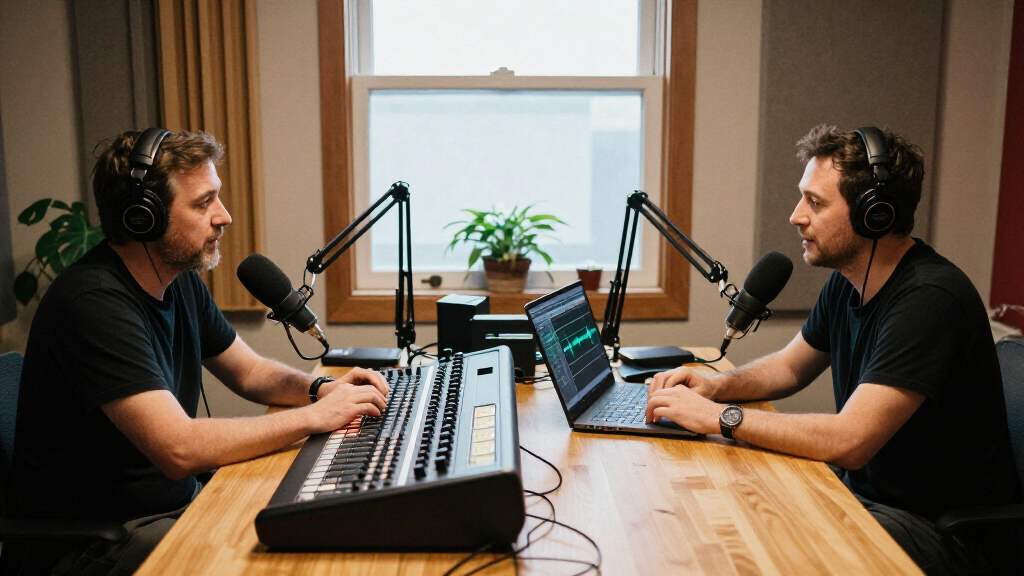

This checklist is for new and growing podcasters assembling a recording setup, whether you plan to work at a desk, record on location, or bring guests into the conversation. The picks cover core audio gear and room treatment, with each slot focused on a different part of the recording process.

Get everyday essentials delivered free with Prime
- Fast, free delivery on millions of items
- Prime Video, Amazon Music and more included
- Member-only deals all year
The sections are organized by what each item does: microphone, monitoring headphones, boom arm, pop filter, portable recorder, and acoustic panels. Product names are included as the picks; check each product’s current specifications and included accessories before deciding how it fits your setup.
Use the checklist to identify your actual recording needs first. Consider your recording space, whether you need to move gear, how many people will record together, and what connections your other equipment requires. Then compare the listed features with your workflow and confirm compatibility before buying.
USB Podcast Microphone
A microphone is the starting point for spoken-word recording, so this slot matters whether you are recording solo or building a setup you can expand. The Shure MV7+ is named as both USB-C and XLR, giving you two connection types to consider when matching it to a computer or other recording equipment. Its product name also identifies it as a dynamic podcast microphone and says a stand is included.
A common buying mistake is assuming that a listed connector guarantees compatibility with every device or recording app. Check the connection requirements for the computer or interface you plan to use, and confirm whether the included stand suits your desk and preferred speaking position. If you expect to use XLR, make sure the rest of your signal chain supports that connection; if you plan to use USB-C, verify that your device has a suitable port or adapter. The product name does not specify every included accessory or software feature, so confirm those details before purchase.
What to look for:
- Confirm your recording device supports USB-C or your XLR setup.
- Check whether the included stand fits your desk and speaking position.
- Consider how close you can comfortably speak to the microphone.
- Verify any additional cables or equipment your setup requires.
- Confirm the listed model and included items before ordering.
Shure MV7+ USB-C & XLR Podcast Dynamic Microphone with Stand – Black

The Shure MV7+ is a versatile dynamic microphone designed for podcasting, streaming, and content creation. It features OBS certification, advanced DSP noise reduction, customizable LED touch controls, and flexible connectivity options via USB-C and XLR.
Pros:
- High-quality sound with noise reduction and voice isolation
- Flexible connectivity options for various setups
- Customizable LED touch controls and app integration
Cons:
- May be complex for beginners due to advanced features
- Requires software for full customization
- Potentially higher price point
Best for: Podcasters choosing between USB-C and XLR connections
Not ideal for: Setups that need a different connection or mounting arrangement
Bottom line: Match its USB-C or XLR connection to your recording setup and confirm the stand suits your workspace.
Closed-Back Studio Headphones
Headphones let you listen to a recording while you work, making them a useful part of a monitoring and editing setup. This pick is identified as the Focal Lensys Professional Closed-Back Headphones. Closed-back design is the key description in the product name for this slot; consider it alongside your recording environment and how you prefer headphones to fit during longer sessions.
A common mistake is choosing headphones without checking comfort and connection fit for the intended use. Confirm that the cable or connection works with the device you will monitor from, and check the product listing for included accessories and fit details. If you record while wearing headphones, consider whether the fit remains comfortable through a typical session and whether the earcups suit your preferences. The name alone does not establish compatibility with a particular recorder, computer, or interface, so verify the connection before buying. These headphones are one part of a monitoring chain; check the other equipment you plan to use with them rather than assuming everything connects directly.
What to look for:
- Check the headphone connection against your monitoring device.
- Review fit and comfort details for your expected session length.
- Confirm what cables or accessories are included.
- Consider whether closed-back headphones suit your recording space.
- Verify compatibility with your recorder, computer, or interface.
Focal Lensys Professional Closed-Back Headphones

Focal’s Lensys Professional headphones feature dual aluminum/magnesium drivers and sound isolation design, providing detailed monitoring and authentic playback. They are designed for studio use, monitoring, and casual listening, with soft memory foam earpads and a sturdy headband for comfort.
Pros:
- High-quality aluminum/magnesium drivers deliver detailed sound
- Effective sound isolation for studio and casual use
- Comfortable soft memory foam earpads and sturdy headband
- Suitable for monitoring, recording, and playback
Cons:
- Wired connection may limit mobility
- Lack of foldable design for portability
- No water resistance for outdoor use
Best for: Podcasters who want closed-back headphones for monitoring
Not ideal for: Buyers who have not confirmed connection and fit requirements
Bottom line: Check the connection, comfort, and included accessories against the equipment you will monitor from.
Desktop Microphone Boom Arm
A boom arm can help position a microphone where you need it while keeping the desk setup organized. The RØDE PSA1+ is listed as a professional studio boom arm, making it the dedicated mounting pick in this checklist. Its value for your setup depends on whether your microphone, desk, and preferred placement work with the arm’s specifications.
One common mistake is assuming that any arm will fit any microphone or desk. Before buying, check mounting compatibility with your microphone and confirm the attachment method and desk requirements in the product details. Think about where the arm will sit, how you want to position the microphone, and whether the arrangement leaves room for your keyboard, monitor, or other recording gear. Confirm what mounting hardware is included rather than assuming the package contains every adapter or accessory you may need. If you are comparing it with a stand, consider how you prefer to arrange your workspace and whether you need the microphone to move between positions. The product name does not specify desk thickness limits or every supported configuration, so verify those details for your actual setup.
What to look for:
- Confirm the arm supports your microphone and its mounting method.
- Check desk attachment requirements and available workspace.
- Review included mounting hardware and any adapter needs.
- Consider how you want to reposition the microphone while recording.
- Verify the product’s dimensions and supported configuration.
RØDE PSA1+ Professional Studio Boom Arm

The RØDE PSA1+ is a professional studio boom arm designed for podcasters, streamers, and broadcasters. It features fully damped internal springs and a neoprene cover to ensure silent operation, along with integrated cable management and full 360-degree rotation for precise microphone placement.
Pros:
- Silent operation due to internal spring damping and neoprene cover
- Integrated cable management keeps setup tidy
- Full 360-degree rotation and extended reach for flexible positioning
- Highly rated by users for professional quality
Cons:
- Limited weight capacity (max 1.2kg) may not support heavier microphone setups
Best for: Desk-based podcasters who want an adjustable microphone position
Not ideal for: Setups where desk mounting or microphone compatibility is unconfirmed
Bottom line: Verify the desk attachment and microphone mounting details before adding this arm to your setup.
Pop Filter Screen
A pop filter screen is intended to sit between the speaker and microphone, so this slot calls for careful accessory checking. The listed pick is named “M100 2-Person Podcast Equipment Bundle, Dual XLR-3.5 Condenser Microph.” That name describes a bundle and mentions dual XLR-3.5 condenser microphones, but it does not clearly identify a pop filter screen or confirm what accessories are included.
A key buying mistake here would be assuming the bundle includes a pop filter because it appears in this checklist slot. Read the product listing closely for the exact contents, the number and type of microphones, and any screens or mounting pieces. Check the connections against your recording equipment, especially if you need to accommodate two speakers. Consider how you will position each microphone and whether the included stands or other hardware, if any, work for your table and recording arrangement. The truncated product name does not provide enough detail to establish compatibility or included accessories, so verify the full listing before deciding whether this bundle fills the pop filter role or whether you need a separate screen.
What to look for:
- Confirm whether a pop filter screen is included at all.
- Check the full bundle contents and the exact product name.
- Verify the stated XLR-3.5 connections against your equipment.
- Confirm the setup supports the number of speakers you plan to record.
- Check what stands, mounts, or other accessories are included.
M100 2-Person Podcast Equipment Bundle, Dual XLR-3.5 Condenser Microphones

This all-in-one podcast bundle is designed for dual-host interviews, live streaming, voice-overs, and online meetings. It includes a mixer, two condenser microphones with pop filters, adjustable stands, and all necessary cables, offering a plug-and-play setup for both amateurs and professionals.
Pros:
- Complete all-in-one setup ideal for dual recording and streaming
- High-quality cardioid condenser microphones for clear, detailed sound
- Plug-and-play design with broad device compatibility
- Built-in effects and Bluetooth support enhance live broadcasts
Cons:
- Limited to 8 hours of battery life for outdoor use
- May be complex for beginners unfamiliar with audio equipment
- No detailed information on price or advanced customization options
Best for: Buyers who need to confirm whether a screen is included
Not ideal for: Anyone needing a clearly specified standalone pop filter
Bottom line: The product name does not confirm a pop filter, so check the full listing and contents before buying.
Portable Audio Recorder
A portable recorder can be useful when your recording plan extends beyond a computer-based desk setup. The Zoom H6essential is named as a 6-track portable recorder with 32-bit float, giving you specific listed features to compare with your needs. Consider whether you need a portable recording device and how its stated track count fits the sessions you expect to capture.
A common mistake is treating a format or track-count label as proof that the recorder will work with every microphone and workflow. Check the inputs and connections in the product details against the microphones you intend to use, and confirm how recordings transfer to the device where you edit. Think through how many people or sources you need to record at once, and whether the listed track configuration meets that plan. Also confirm included accessories and the power arrangement, since those details are not established by the product name. If you mainly record at a fixed desk, consider whether portability is useful to you; for location recording, check the full specifications for the connections and accessories your session requires.
What to look for:
- Match the 6-track description to the number of sources you record.
- Check recorder inputs against your microphones and other gear.
- Confirm how recordings transfer to your editing device.
- Review included accessories and power requirements.
- Verify the full specifications for your intended recording workflow.
Zoom H6essential 6-Track Portable Recorder with 32-Bit Float

The Zoom H6essential records up to six tracks with 32-bit float audio, built-in stereo X/Y microphones, and four XLR/TRS inputs. It can also function as a USB audio interface while recording to an SD card, and includes spoken audio guidance for menu navigation.
Pros:
- 32-bit float recording helps prevent clipping
- Four combo inputs plus built-in stereo microphones
- Can record to SD card while functioning as a USB audio interface
- Spoken menu guidance supports accessible operation
Cons:
- Interchangeable capsules beyond the included microphones are optional
- Requires four AAA batteries
Best for: Podcasters who want a recorder for portable sessions
Not ideal for: Buyers who have not checked inputs and workflow fit
Bottom line: Compare its listed track count and connections with the sources and equipment you plan to record.
Acoustic Foam Panels
Room treatment is the part of this checklist that focuses on the recording environment. The ATS Acoustics pick is named as a sound-absorbing acoustic panel measuring 24 by 24 inches and 4 inches thick, with a beveled edge. Those listed dimensions give you a starting point for planning placement and checking available wall space.
A common mistake is buying panels before considering where they will fit or how many the room needs. Measure the intended area and compare it with the panel dimensions; confirm the number of panels included and the installation requirements in the listing. Think about the surfaces and locations you want to treat, and make sure the panel format suits the space. The product name identifies a sound-absorbing panel, but does not specify the coverage for your room or how it will perform in your particular setup. Verify the full product details and installation method before arranging the room around it. Plan placement based on your workspace and recording position, and avoid assuming that one panel size or quantity will suit every room.
What to look for:
- Measure the intended wall area against the 24-by-24-inch dimensions.
- Confirm how many panels are included in the listing.
- Check installation requirements and mounting hardware.
- Consider the 4-inch thickness when planning placement.
- Verify that the panel size and placement suit your recording space.
ATS Acoustics Sound Absorbing Acoustic Panel 24" x 24" x 4" Beveled Edge (Ivory)

These acoustic panels are designed to improve sound clarity by effectively controlling reverb and echo. Made with a mineral wool core and wrapped in jute burlap fabric, they are suitable for various spaces like studios, offices, and home theaters, offering easy installation and durable construction.
Pros:
- Effective sound absorption with NRC rating of 1.15
- Easy to install with included hardware and template
- Durable, furniture-grade quality with attractive burlap fabric
- Suitable for various residential and commercial spaces
Cons:
- Limited color options (Ivory only)
- May require multiple panels for larger rooms
- Heavy weight (8 pounds) may need sturdy mounting
Best for: Podcasters measuring a space for sound-absorbing panels
Not ideal for: Buyers who have not checked quantity or installation needs
Bottom line: Measure your intended placement and confirm panel quantity and installation details before ordering.
You do not need every item to begin making a checklist for your setup. Verify fit and compatibility against your actual gear, room, and recording plans, then add pieces as your workflow calls for them. A little checking before ordering helps you choose equipment that works together and fits the way you want to record.