
When deciding to push a mobile alert, your newsroom considers the urgency, impact, and audience engagement. You assess how critical the news is, whether it’s time-sensitive, and if immediate alerting will keep your audience informed or safe. You analyze real-time data and audience behavior to choose the best moment to send notifications, balancing importance against alert fatigue. If you want to understand more about these decision-making factors, keep exploring how newsrooms optimize their alert strategies.
Key Takeaways
- Newsrooms assess the urgency and significance of the event to determine if immediate alerting is necessary.
- Real-time data and audience behavior insights guide optimal timing for pushing alerts.
- Alerts are carefully prioritized to avoid desensitizing users with excessive notifications.
- Critical situations, like natural disasters, prompt immediate alerts to ensure safety and awareness.
- The potential impact and audience engagement patterns influence whether alerts are sent immediately or delayed.

Have you ever missed an important update because you weren’t near your computer? If so, you know how essential timely alerts are in today’s fast-paced news environment. When a newsroom decides to push a mobile alert, it’s not a random choice; it’s a carefully considered decision aimed at maximizing audience engagement. The key lies in finding the right balance between alert timing and the significance of the news. You don’t want to flood your audience with every minor update, but you also don’t want to delay critical information that could impact safety, reputation, or public interest.
Newsrooms weigh the urgency of the event against the potential of the alert to cause unnecessary panic or fatigue. For high-impact stories—like natural disasters, security threats, or major political developments—they lean towards immediate alerting to keep their audience informed and safe. The timing of these alerts is crucial; delay could mean missed opportunities to inform or warn. Conversely, for less urgent stories, newsrooms may opt for a more measured approach, waiting until they can deliver a thorough update or until the event reaches a point where an alert adds real value. Incorporating real-time data can further refine these decisions, ensuring alerts are timely and relevant. Additionally, understanding audience behavior helps in predicting when notifications will be most effective.
Audience engagement plays an indispensable role in these decisions. Newsrooms analyze how their audience consumes content, how often they check their devices, and what kind of notifications prompt action. This helps in fine-tuning alert timing—sending alerts when they’re most likely to be seen and acted upon. They also consider the potential for alert fatigue, which can desensitize users if they receive too many notifications. That’s why many newsrooms establish thresholds for alerts, ensuring that only the most critical updates prompt push notifications. Additionally, understanding content formats and how audiences prefer to receive information helps optimize alert strategies. Employing notification management tools can assist in reducing unnecessary alerts and maintaining audience trust. Recognizing the importance of timely alerts is essential for effective communication and audience retention.
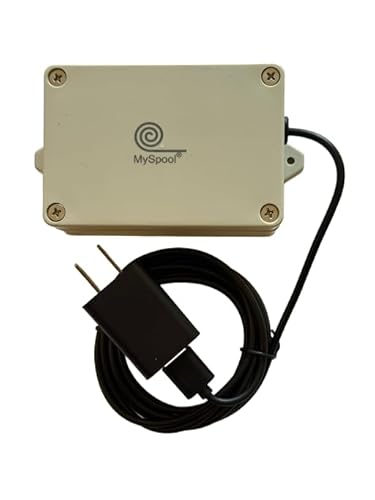
Alert Notifications for DIY Projects, 4 Short and 1 DC Voltage sensors, A/C Powered. Receive email and Push Notifications.
- Wireless Alert Range: Over 200 feet with WiFi
- Notification Types: Email and push alerts
- Sensor Configuration: Custom messages and intervals
As an affiliate, we earn on qualifying purchases.
As an affiliate, we earn on qualifying purchases.
Frequently Asked Questions
How Do Newsrooms Prioritize Alerts During Major Events?
During major events, you prioritize alerts based on audience engagement and the event’s significance. You assess which updates will inform or impact your audience most, ensuring timely delivery. Technological challenges, like server capacity or alert fatigue, influence your decision-making, so you carefully balance urgency with clarity. Your goal is to keep your audience informed without overwhelming them, making strategic choices that maximize engagement and minimize technical issues.
What Training Do Staff Receive for Issuing Emergency Alerts?
You receive staff training focused on alert protocols to guarantee you understand when and how to issue emergency alerts properly. This training covers identifying urgent situations, verifying information, and following established procedures to avoid false alarms. You learn to act swiftly and accurately, knowing the importance of clear communication during crises. Regular drills and updates keep your skills sharp, helping you respond effectively and responsibly when it’s critical to push a mobile alert.
How Do Alerts Differ Across Various Digital Platforms?
Like a conductor guiding an orchestra, your alert strategies differ across platforms. On social media, you use push notifications to boost user engagement tactics, opting for shorter, eye-catching messages. Email alerts allow more detailed information, catering to users seeking in-depth updates. Websites often feature prominent banners, while mobile apps push timely notifications. Tailoring your push notification strategies to each digital platform guarantees you connect effectively, keeping your audience informed and engaged in every context.
What Legal Considerations Influence Alert Timing and Content?
You must guarantee legal compliance and respect privacy concerns when timing and crafting alerts. Laws like GDPR or COPPA influence how quickly you send alerts and what information you include, especially if personal data is involved. If you ignore these legal considerations, you risk fines or damaging your reputation. Always verify that your alert content and timing adhere to relevant regulations, prioritizing user privacy and legal standards above all.
How Do Newsrooms Measure the Effectiveness of Their Alerts?
You measure the effectiveness of your alerts by analyzing audience engagement metrics like click-through rates, shares, and dwell time. While high engagement indicates your message resonates, you also assess alert accuracy to build trust. Juxtaposing these measures shows that engaging your audience depends on delivering precise, timely information. By continuously monitoring these data points, you refine your alert strategies, ensuring you inform effectively without sacrificing credibility.

Lean Analytics: Use Data to Build a Better Startup Faster (Lean Series)
As an affiliate, we earn on qualifying purchases.
As an affiliate, we earn on qualifying purchases.
Conclusion
Remember, timing is everything when it comes to mobile alerts. You have to strike a balance between urgency and relevance, ensuring your audience receives important news without feeling overwhelmed. Trust your newsroom’s judgment and prioritize clarity. As the saying goes, “A stitch in time saves nine.” When you act swiftly and thoughtfully, you keep your audience informed and engaged, strengthening their trust in your newsroom’s commitment to delivering timely, essential updates.

Safety+ 4G Medical Alert System: Fall Detection, GPS Location, 24/7 Monitoring, Mobile Caregiver App, Small, Lightweight-Call to Activate Wireless Call Button, Personal Safety, Wearable Panic Button
- Includes First Month of Service: Activate easily with included service
- 24/7 Nationwide Emergency Monitoring: Support at home and on the go
- Automatic Fall Detection: Detects falls and alerts monitoring center
As an affiliate, we earn on qualifying purchases.
As an affiliate, we earn on qualifying purchases.

Smart Home Energy Monitor with 16 50A Circuit Level Sensors, Real-Time Power Usage & Electricity Cost Tracking, Ideal for Rental Homes & Shared Apartments, App History, Compatible with Home Assistant
- Easy Installation: Fits most circuit panels with clamp-on sensors
- Real-Time Power Monitoring: Track energy usage anytime, anywhere
- Electricity Cost Tracking: Monitor costs and prevent costly repairs
As an affiliate, we earn on qualifying purchases.
As an affiliate, we earn on qualifying purchases.