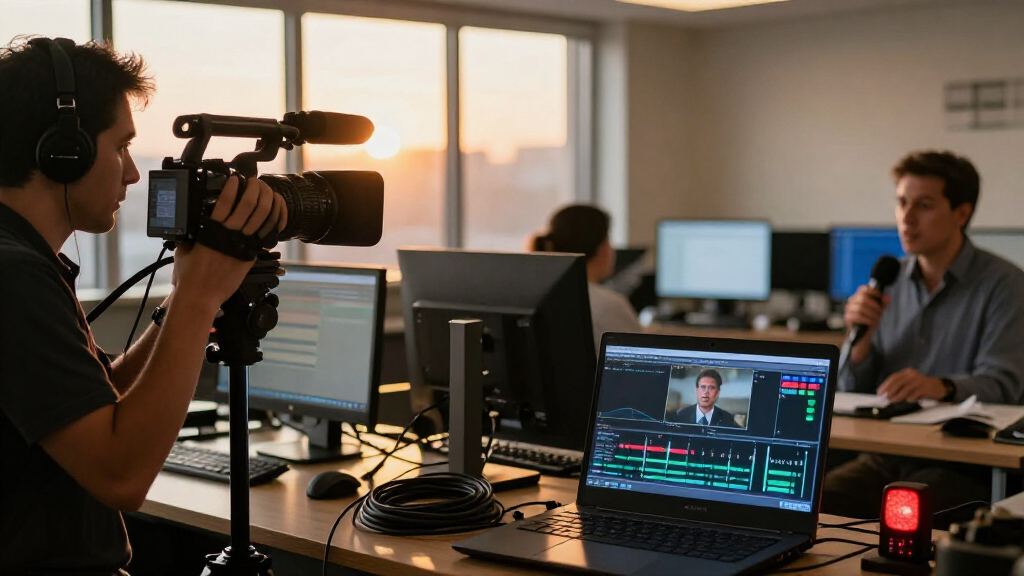

This checklist is for news teams, independent reporters, and anyone putting together a live news streaming setup. It covers the gear that carries video and sound, supports a streaming workflow, and helps you plan a stable camera position and lighting.

Get everyday essentials delivered free with Prime
- Fast, free delivery on millions of items
- Prime Video, Amazon Music and more included
- Member-only deals all year
The sections follow the main parts of the setup: capture card, microphone, encoder, tripod, lighting, and network cable. Each slot explains its role, common compatibility or setup pitfalls, and what to check before choosing the listed pick or another option.
Use it as a compatibility checklist before you buy. Confirm the connections and capabilities of your camera, computer or streaming device, and streaming platform; then work through the look-for points and decide which pieces fit your reporting environment.
HDMI Capture Card
A capture card brings a camera’s HDMI video into a computer or compatible streaming device. This slot matters when your camera does not send video directly to the system you plan to stream from, or when you want a dedicated connection between the two. The listed pick is a USB 3.0 HDMI capture card with a stated 1080p 60fps output and 4K HDMI input. Check that those specifications match the camera’s output and the resolution you intend to stream; input support alone does not mean the stream itself will be 4K.
A common buying mistake is assuming every HDMI source works the same way. Confirm the camera can provide a clean HDMI signal, and check whether your computer and streaming software recognize the card. Also verify the card’s USB connector and whether your system has an appropriate USB 3.0 port. If you use a laptop, consider port availability alongside other connected gear. Review any format or signal requirements for your camera and streaming workflow before relying on the card for a live report.
Think through cable length and placement as well: the camera, card, and streaming device need to reach one another without putting strain on connectors. Test the full chain before going live, including picture, frame rate, and audio routing.
What to look for:
- Confirm the camera provides HDMI video in a format the card accepts.
- Match the card’s output resolution and frame rate to the planned stream.
- Check USB connector type, port availability, and system recognition.
- Verify compatibility with your computer and streaming software.
- Plan cable reach and test the complete camera-to-stream setup.
USB 3.0 HDMI Capture Card, 1080p 60fps with 4K HDMI Input
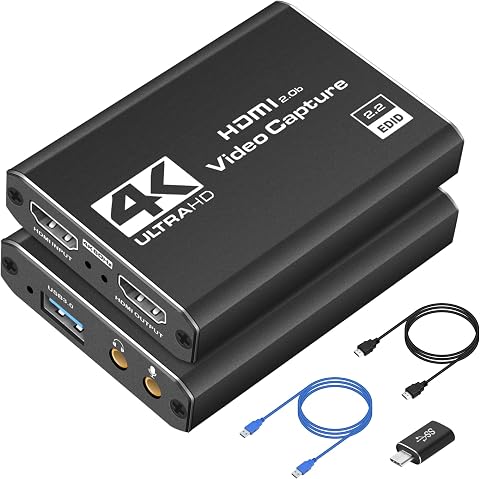
This plug-and-play USB 3.0 capture card records HDMI video at up to 1080p and 60fps, with 4K HDMI support and real-time preview. It is compatible with Windows and Mac systems, popular streaming software, and HDMI devices such as gaming consoles, PCs, and cameras.
Pros:
- Captures video at 1080p and 60fps with 4K HDMI support.
- Plug-and-play setup works without additional drivers.
- Compatible with Windows, macOS, common streaming software, and multiple HDMI devices.
- Compact and lightweight for portable use.
Cons:
- Requires a USB 3.0 port.
- Capture resolution is limited to 1080p at 60fps.
Best for: Reporters routing HDMI camera video into a computer
Not ideal for: Setups that need direct camera-to-platform streaming without a computer
Bottom line: Choose this card when its HDMI and USB connections match your camera and streaming device.
Wireless Lavalier Microphone
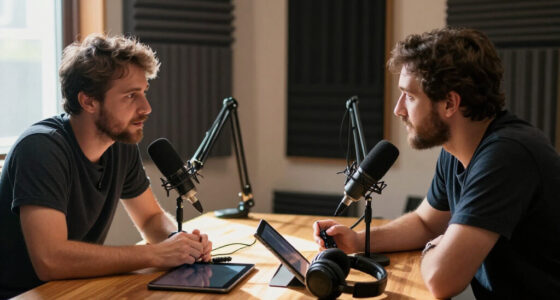
Clear speech is essential when viewers need to follow a live report, especially when the reporter must move or stand away from the camera. A wireless lavalier system places a microphone near the speaker and sends audio to a receiver connected to the recording or streaming setup. The listed pick is the DJI Mic 3 kit with two transmitters, one receiver, and a charging case. That configuration may suit interviews or a reporter and guest, provided the receiver can connect to the device handling the stream.
Before buying, check the receiver’s connection options against your camera, computer, or encoder. A wireless microphone that pairs with one device may still need an adapter or a different cable for another. Confirm how many people you need to mic at once and whether the transmitters can be placed securely on clothing. A frequent mistake is testing only in a quiet room; clothing movement, wind, and surrounding activity can affect usable audio. Plan a sound check in conditions close to the actual reporting location.
Also consider charging and monitoring. Make sure you can confirm the microphone is transmitting and that audio is reaching the stream at a usable level. Keep a backup audio plan available for important coverage, and test both transmitters if you expect to use them together.
What to look for:
- Match receiver outputs to the camera, computer, or encoder input.
- Confirm the number of transmitters covers the people being interviewed.
- Check attachment and placement options for reporter clothing.
- Test speech, clothing noise, and wind in the intended location.
- Verify charging routine, audio monitoring, and backup recording plan.
DJI Mic 3 (2 TX + 1 RX + Charging Case) Wireless Microphone
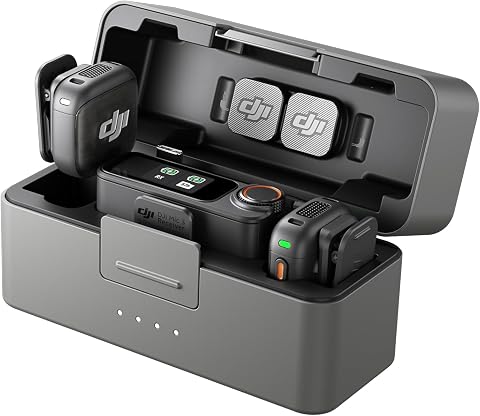
The DJI Mic 3 is a lightweight, pocket‑sized wireless lavalier system that includes two transmitters, one receiver and a charging case. It offers adaptive gain control, dual‑band anti‑interference, up to 28 hours of battery life and 32‑bit float internal recording for reliable, high‑quality audio in any setting.
Pros:
- Compact, pocket‑friendly design makes it easy to carry for on‑the‑go recording.
- Supports up to four transmitters and eight receivers for multi‑person interviews or podcasts.
- Adaptive gain control and dual‑band anti‑interference ensure clear audio in noisy environments.
- Internal 32‑bit float recording provides a reliable backup in case of signal loss.
Cons:
- Requires four C‑type batteries, which may be less convenient than rechargeable lithium cells.
Best for: Reporters who need wireless audio for one or two speakers
Not ideal for: Users whose streaming device lacks a compatible receiver connection
Bottom line: Confirm the receiver connection and test speech in realistic conditions before relying on the kit.
Portable Video Encoder
A portable encoder or streaming studio can combine video sources and send a live program onward, depending on the device and workflow. This slot matters for teams that want a field-oriented setup without making a laptop the center of every production. The listed pick is the YoloLiv YoloBox Ultra, named as a 4K live streaming studio. Check the device’s actual input and output options against your cameras, microphones, and intended streaming destination before building a kit around it.
One common mistake is treating a product name or resolution label as a complete compatibility guarantee. Confirm that your camera connections are supported, that your audio path works as planned, and that the encoder can reach your network in the field. Verify platform support and any account or configuration requirements ahead of a live assignment. Consider how many sources you need to switch between and whether the controls are manageable for the person producing the stream.
Plan power and connectivity as carefully as video. A portable setup may still depend on available power and a reliable internet connection, so identify those needs at the reporting location. If you use cellular or wired networking, test the path end to end. Rehearse the full workflow—from source connection through platform output—before a consequential broadcast.
What to look for:
- Verify camera and audio input compatibility for your exact sources.
- Confirm support for the streaming platform and account setup.
- Check network connection options at the intended reporting location.
- Plan power and operating setup for the length of the broadcast.
- Rehearse source switching and the complete stream path.
YoloLiv YoloBox Ultra 4K Live Streaming Studio

The YoloBox Ultra combines a 4K encoder, switcher, recorder, and 8-inch touchscreen monitor for live production without a laptop. It supports simultaneous horizontal and vertical streaming, four HDMI inputs, ISO recordings, and network bonding with NDI and SRT support.
Pros:
- Combines switching, encoding, recording, and monitoring in one device
- Supports simultaneous horizontal and vertical streaming
- Offers four HDMI inputs and ISO recording
- Can combine up to five network connections for streaming
Cons:
- NDI and SRT features may involve additional charges
- The listed battery recovery instructions require two 45W chargers
Best for: Teams seeking a portable device-centered streaming workflow
Not ideal for: Setups whose sources or platform requirements do not match its supported connections
Bottom line: Check inputs, platform support, networking, and power before making it the center of your setup.
Camera Tripod
A tripod keeps the camera steady and makes framing more repeatable during a live report. It matters whether the camera is a compact device or a larger camera with accessories, since the complete setup affects the support required. This checklist slot has no named product, so use it to assess the camera, mounting hardware, and shooting location together. Look for a secure camera fit and a head that lets the operator frame the shot smoothly.
A common mistake is choosing support based only on the camera body. Include the lens, microphone, monitor, or other mounted accessories when checking the tripod’s load rating. Confirm the mounting plate or screw is compatible with the camera, and make sure the head can hold the chosen angle without slipping. For outdoor reporting, assess the ground and expected conditions; an uneven surface may call for adjustable legs and careful leveling.
Consider the height range, folded size, and how quickly the tripod can be set up and secured. A tall maximum height does not help if the legs cannot be positioned safely in the available space. Check that the tripod footprint will not obstruct a walkway or create a hazard around the reporting area. Before going live, tighten the connections, test the pan and tilt if needed, and confirm the camera remains stable after framing.
What to look for:
- Match the load rating to the camera and all mounted accessories.
- Confirm the mounting plate or screw fits the camera.
- Check head movement and ability to hold the intended framing.
- Assess leg adjustment, height, footprint, and folded transport size.
- Test stability and secure placement at the reporting location.
Portable LED Panel
Portable lighting can help a reporter remain visible when available light is weak or uneven. This slot is especially useful for indoor locations, evening coverage, or situations where the camera position cannot be moved to better light. The listed pick is the GVM two-pack LED video lighting kit with app control. Check the kit’s controls and mounting arrangement against the way you plan to position lights and manage the stream.
A common mistake is placing a bright panel too close or pointing it directly at a face without checking the result on camera. Light can look different through the camera than it does to the eye, so test framing and exposure at the planned distance. Think about whether you need one light or two, where each stand can safely fit, and whether the setup will interfere with the crew or passersby. Confirm the kit’s power arrangements are suitable for the location and duration of coverage.
App control can be useful when the lights are positioned out of reach, but check that the control method works with the devices you will bring. Plan how to transport, position, and secure the panels and any stands. Preview the image on camera before going live, and adjust the placement until the reporter and background are both appropriate for the shot.
What to look for:
- Confirm the kit’s power and control requirements for your location.
- Check light placement and stand options for the available space.
- Test brightness and appearance through the actual camera.
- Consider whether one panel or both suit the scene and framing.
- Secure lights and stands away from walkways and crew movement.
GVM 2-Pack LED Video Lighting Kit with App Control
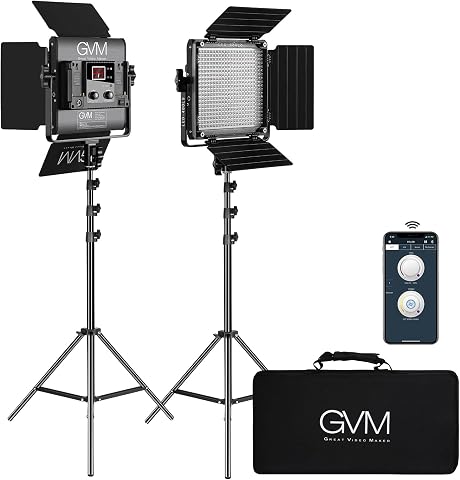
This two-panel LED lighting kit offers app and onboard control of brightness and color temperature, with a digital display and soft diffusers for portrait and video lighting. It includes light stands, power adapters, barn doors, and a carrying bag; panels can run on AC power or compatible Sony F-series batteries, which are not included.
Pros:
- App and onboard controls with a wide adjustable color temperature range
- High CRI and TLCI ratings for color rendering
- Includes stands, diffusers, barn doors, adapters, and a carrying bag
- Can run on AC power or compatible batteries
Cons:
- Compatible batteries are not included
- The raw listing gives conflicting warranty details: 180 days and one year
Best for: Teams that need portable lighting for controlled reporter framing
Not ideal for: Locations without safe space or suitable power for the lighting setup
Bottom line: Test the panels through your camera and confirm safe placement before a live report.
Ethernet Cable
A wired network connection can be part of a streaming setup when the reporting location provides a compatible Ethernet port and network access. This slot is about planning the physical connection from the encoder or computer to the network. The listed pick is a TRUE CABLE Cat6 outdoor bulk cable, described as shielded F/UTP and 1000 feet long. Its bulk format makes route planning and termination especially relevant: confirm what connectors or termination work your installation requires.
A frequent mistake is assuming that a cable’s category or outdoor description guarantees compatibility with every device or installation. Check the Ethernet port on the streaming device, the network equipment at the location, and the cable’s intended environment. Confirm the cable is appropriate for the route and installation method, including any exposure or protection needs. A bulk cable may require separate connectors and tools, so account for the people and equipment needed to prepare and test the run.
For a live setup, consider the route length, potential trip hazards, and how the cable will be secured. Avoid leaving a long run loose across a public or work area. Test the completed connection with the actual encoder or computer and confirm network access before the broadcast. Check the whole network path, since a cable alone cannot guarantee that the location’s network permits streaming.
What to look for:
- Verify the cable’s environment and route suitability for the installation.
- Confirm Ethernet port and network equipment compatibility.
- Plan termination, connectors, and tools for the bulk cable.
- Measure the route and secure it to reduce trip and snag hazards.
- Test network access and the complete streaming connection ahead of time.
TRUE CABLE Cat6 Outdoor Bulk Ethernet Cable, Shielded F/UTP, 1000ft, Black, UV R

This outdoor Cat6 Ethernet cable features shielded F/UTP design with solid bare copper conductors, suitable for high-speed network applications up to 10 Gigabit. It is UV resistant and designed for outdoor use, offering reliable performance over long distances.
Pros:
- High-performance with 550MHz bandwidth and support for 10 Gigabit speeds
- UV resistant and suitable for outdoor use
- Pre-spooled for easy installation and reliable connections with pure copper conductors
Cons:
- Not rated for direct burial, requires above ground installation
- Bulk length may be excessive for small projects
Best for: Installations that need a routed outdoor Ethernet cable run
Not ideal for: Quick field kits that need a ready-made short patch cable
Bottom line: Plan termination and routing, then test network access through the complete cable run.
Build the setup in a function-first order: confirm the camera-to-stream path, then make sure the audio and network connections work with the device that will carry the broadcast. Add stable camera support and lighting based on the reporting location, and plan power, adapters, and cable routing around the full kit.
You do not need to solve every production detail at once. Start with the connections your current camera and streaming workflow require, test them together, and expand the setup as your coverage needs become clearer. A full rehearsal before going live helps reveal fit and compatibility issues while there is still time to adjust.