For shoppers tracking Black Friday streaming devices deals, my best overall pick is the Roku Ultra (2024) Renewed: it pairs 4K playback with a Voice Remote Pro, making it a stronger all-around choice than a basic stick. The Fire TV Stick 4K Max (2nd Gen) is a standout for Amazon households that want a compact device with Wi-Fi 6E, while the onn Android TV 4K player suits buyers seeking a simple, cable-included setup. The main tradeoffs are refurbished versus new condition, platform preference, and whether you need 4K, hands-free voice control, or just reliable HD streaming. A higher-end box can add connectivity and remote features, but those extras may not matter on an older or secondary TV. Read on for the full breakdown and help matching a device to your setup.

Get everyday essentials delivered free with Prime
- Fast, free delivery on millions of items
- Prime Video, Amazon Music and more included
- Member-only deals all year
Key Takeaways
- Roku Ultra (2024) Renewed is my best overall: it offers a more capable remote and player format than Roku‘s streaming sticks, but its renewed condition may not suit buyers who want a new device.
- Fire TV Stick 4K Max models lead the compact Amazon options: the refurbished version may appeal to deal hunters, while the new version avoids the condition uncertainty that comes with refurbished stock.
- The two Fire TV Cube listings target hands-free control: the new 3rd Gen model and its refurbished counterpart share a more powerful, box-style approach, so condition and setup needs matter more than the product name.
- Roku and Fire TV split the lineup by interface preference: Roku options emphasize a straightforward streaming experience, while Fire TV choices make more sense for shoppers already invested in Alexa and Amazon services.
- Not every TV needs a 4K upgrade: the Fire TV Stick HD is a simpler fit for an HD screen, while 4K sticks, players, and the premium Roku Ultra make more sense when the display and home network can benefit from them.
| Roku Streaming Stick 4K (Renewed) with Voice Remote | 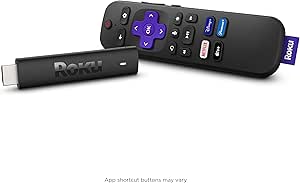 | Best Value for Roku Fans | Brand: Roku | Model: 3820R | Video resolution: 4K | VIEW LATEST PRICE | See Our Full Breakdown |
| Amazon Fire TV Stick 4K Select with Alexa Voice Remote |  | Best Entry-Level Fire TV Pick | Dimensions: 3.9 × 1.2 × 0.6 in | Weight: 1.5 oz | Processor: Quad-core, 1.7 GHz | VIEW LATEST PRICE | See Our Full Breakdown |
| Amazon Fire TV Cube (3rd Gen), 4K Ultra HD Streaming Device with Wi-Fi 6E, Hands-Free Alexa, and Octa-Core Processor |  | Best Premium Streaming Hub | Dimensions: 3.38 × 3.38 × 2.99 in | Weight: 1.13 lb | Processor: Octa-core: 4 × 2.2 GHz and 4 × 2.0 GHz | VIEW LATEST PRICE | See Our Full Breakdown |
| Amazon Fire TV Cube (3rd Gen) – Refurbished |  | Best Refurbished Premium Option | Model: Fire TV Cube (3rd Gen) | Dimensions: 3.38 × 3.38 × 2.99 in | Weight: 1.13 lb | VIEW LATEST PRICE | See Our Full Breakdown |
| Roku Ultra (2024) Renewed – 4K Streaming Player with Voice Remote Pro |  | Best for Wired Roku Setups | Model: Roku Ultra (2024) | Resolution: 4K (3840 pixels) | HDR support: HDR10+, Dolby Vision | VIEW LATEST PRICE | See Our Full Breakdown |
| Amazon Fire TV Stick 4K Max (2nd Gen) – Refurbished |  | Best Refurbished Performance Pick | Condition: Refurbished (Like-New) | Processor: Quad-core 2.0GHz | Storage: 16GB | VIEW LATEST PRICE | See Our Full Breakdown |
| onn Android TV 4K UHD Streaming Media Player with Voice Remote and HDMI Cable |  | Best Google TV-Style Value Pick | Model: 100026240 | Resolution: 4K UHD (3840 × 2160 pixels) | Operating system: Android TV | VIEW LATEST PRICE | See Our Full Breakdown |
| TiVo Stream 4K Streaming Media Player |  | Best for Unified Content Discovery | Model: RA2400 | Resolution: 4K UHD | HDR: Dolby Vision | VIEW LATEST PRICE | See Our Full Breakdown |
| Roku Streaming Stick Plus with Voice Remote (Renewed) |  | Best Compact Roku Pick | Model: 3830XB | Condition: Renewed | Resolution: 4K | VIEW LATEST PRICE | See Our Full Breakdown |
| Amazon Fire TV Stick HD with Alexa Voice Remote |  | Best for Basic HD Streaming | Resolution: Full HD | Wi-Fi: Wi-Fi 6 | Connection: HDMI | VIEW LATEST PRICE | See Our Full Breakdown |
| Amazon Fire TV Stick 4K Max (2nd Gen) Streaming Device |  | Best Overall Fire TV Stick | Processor: Quad-core 2.0GHz | Storage: 16GB | Wi-Fi: Wi-Fi 6E tri-band | VIEW LATEST PRICE | See Our Full Breakdown |
| Amazon Fire TV Stick 4K Plus |  | Best for Cloud Gaming | Processor: Quad-core 1.7GHz | GPU: 650MHz | Storage: 8GB | VIEW LATEST PRICE | See Our Full Breakdown |
| Xiaomi TV Stick 4K (2nd Gen) Streaming Device with Google TV |  | Best for Google TV and Travel | Model: MDZ-33-AA-2 | Resolution: 4K (3840 x 2160) | Processor: 6nm quad-core, 2.5GHz | VIEW LATEST PRICE | See Our Full Breakdown |
| Amazon Fire TV Stick 4K with Alexa+ and Wi-Fi 6 |  | Best for a Simple, Low-Clutter Setup | Resolution: 4K | HDR: HDR10+ | Wi-Fi: Wi-Fi 6 | VIEW LATEST PRICE | See Our Full Breakdown |
| Roku Ultra Streaming Player (4K, HDR10+, Dolby Vision, Wi-Fi 6) |  | Best Premium Wired Streaming Player | Resolution: 4K (3840 x 2160) | Video formats: H.264/AVC, H.265/HEVC, AV1, VP9, HDR10/10+, Dolby Vision | Audio support: Dolby Atmos | VIEW LATEST PRICE | See Our Full Breakdown |
| Black Friday streaming devices deal | Connectivity | Resolution |
|---|---|---|
| Roku Streaming Stick 4K | Wi-Fi | — |
| Amazon Fire TV Stick 4K Select | — | — |
| Amazon Fire TV Cube | — | — |
| Amazon Fire TV Cube | Tri-band Wi-Fi 6E, Bluetooth 5.0 + LE, Ethernet | — |
| Roku Ultra | Wi-Fi 6, Bluetooth, Ethernet, HDMI, USB | 4K (3840 pixels) |
| Amazon Fire TV Stick 4K Max | — | — |
| onn Android TV 4K UHD Streamin | HDMI, Wi-Fi | 4K UHD (3840 × 2160 pixels) |
| TiVo Stream 4K Streaming Media | Wi-Fi | 4K UHD |
| Roku Streaming Stick Plus with | HDMI, Wi-Fi | 4K |
| Amazon Fire TV Stick HD with A | — | Full HD |
| Amazon Fire TV Stick 4K Max | — | — |
| Amazon Fire TV Stick 4K Plus | — | — |
| Xiaomi TV Stick 4K | Wi-Fi 6, Bluetooth, HDMI, USB | 4K (3840 x 2160) |
| Amazon Fire TV Stick 4K with A | — | 4K |
| Roku Ultra Streaming Player | Wi-Fi 6, Ethernet, Bluetooth, HDMI, USB | 4K (3840 x 2160) |
More Details on Our Top Picks
Roku Streaming Stick 4K (Renewed) with Voice Remote
For a Black Friday shortlist focused on capable streaming without a bulky player, this renewed Roku Streaming Stick 4K makes a practical pick. It supports 4K, Dolby Vision, and HDR10+, while its HDMI stick design keeps the setup discreet behind the TV. The included voice remote also handles TV power and volume, so you can avoid juggling remotes. Compared with the Roku Ultra (2024) Renewed, this model gives up Ethernet, Wi-Fi 6, Dolby Atmos, and the premium rechargeable remote in exchange for a simpler, smaller setup. Its main Black Friday caveat is the renewed condition and 90-day limited warranty; the Wi-Fi-only connection also makes it less suitable where wireless coverage is unreliable. I’d choose it for a 4K Roku setup on a solid home network, not for a wired or high-end audio system.
Pros:- Supports 4K, Dolby Vision, and HDR10+
- Compact HDMI stick keeps the device out of sight
- Voice remote controls TV power, volume, and content search
- Access to Roku channels and major streaming apps
Cons:- Renewed condition comes with a 90-day limited warranty
- Wi-Fi-only connection depends on a stable wireless network
- Lacks the Ethernet, Wi-Fi 6, and Dolby Atmos options of the Roku Ultra (2024) Renewed
Best for: Roku users who want a compact 4K upgrade for a TV with dependable Wi-Fi and do not need Ethernet or premium audio features
Not ideal for: Buyers who want a new device, a longer warranty, wired networking, or a premium remote and Dolby Atmos support
- Brand:Roku
- Model:3820R
- Video resolution:4K
- HDR formats:Dolby Vision, HDR10+
- Connectivity:Wi-Fi
- Connector:HDMI
- Storage:4 GB
- Condition and warranty:Renewed; 90-day limited warranty
Our verdict“Choose this renewed stick for a compact Roku 4K setup if you accept a shorter warranty and have reliable Wi-Fi.”
Amazon Fire TV Stick 4K Select with Alexa Voice Remote
The Fire TV Stick 4K Select is the straightforward choice for shoppers who want 4K streaming and Alexa voice search in a small HDMI device, without moving up to a hands-free box. Its HDR10+ support and broad video-format compatibility suit a compatible 4K TV, while 8 GB of storage gives apps room on the device. Alexa can search across apps and control compatible smart-home equipment, although that does not make every service or device work without a subscription or added hardware. Compared with the Fire TV Cube (3rd Gen), the Select relies on its remote rather than built-in microphones, and it lacks the Cube’s Wi-Fi 6E and HDMI input/output features. That tradeoff makes sense for a simpler setup, but not for buyers seeking hands-free control or advanced home-theater connections. It also needs Wi-Fi, power, and an available HDMI port.
Pros:- Supports 4K resolution, HDR10+, and HLG
- Alexa Voice Remote searches across apps and supports compatible device controls
- Compact HDMI stick with dual-band Wi-Fi and Bluetooth 5.0
- Supports a range of video formats, including AV1
Cons:- Remote-based voice control is less convenient than the hands-free microphones on the Fire TV Cube (3rd Gen)
- Requires Wi-Fi, a power outlet, and an available HDMI input
- Some content and cloud gaming features require subscriptions or compatible equipment
Best for: Fire TV newcomers with a 4K TV who want Alexa search through a remote and do not need a hands-free hub
Not ideal for: Viewers who want Dolby Vision, built-in hands-free Alexa, Ethernet, or HDMI passthrough connections
- Dimensions:3.9 × 1.2 × 0.6 in
- Weight:1.5 oz
- Processor:Quad-core, 1.7 GHz
- Internal storage:8 GB
- Wi-Fi:Dual-band, dual-antenna MIMO; 802.11a/b/g/n/ac
- Bluetooth:Bluetooth 5.0 and Bluetooth Low Energy
- Video formats:HDR10, HDR10+, HLG, H.265, H.264, VP9, AV1
- Maximum supported resolution:2160p up to 60 fps
- Warranty:90-day limited warranty
Our verdict“Pick the Fire TV Stick 4K Select for remote-based Alexa and 4K HDR10+ streaming in a simple stick setup.”
Amazon Fire TV Cube (3rd Gen), 4K Ultra HD Streaming Device with Wi-Fi 6E, Hands-Free Alexa, and Octa-Core Processor
Among these picks, the Fire TV Cube (3rd Gen) is the premium option for a Black Friday upgrade built around speed, voice control, and home-theater connections. Its octa-core processor and 16 GB of storage give it more headroom than the Fire TV Stick 4K Select, while Wi-Fi 6E can help in a crowded network when paired with a compatible router. Built-in microphones and speakers let Alexa respond without picking up a remote, and HDMI 2.1 input and output add flexibility for compatible equipment. The tradeoff is that its strongest network advantage depends on a 6 GHz-capable router with WPA3, and it takes more space than a stick. The Roku Ultra (2024) Renewed is another box-style alternative, but this Cube better suits buyers invested in Alexa; its 1.13-pound listed weight and need for suitable cables and a 4K TV make it less of a simple plug-in choice.
Pros:- Octa-core processor and 16 GB of storage
- Hands-free Alexa control through built-in microphones and speakers
- Wi-Fi 6E support for compatible routers
- 4K video with Dolby Vision, HDR formats, and Dolby Atmos support
Cons:- Wi-Fi 6E benefits require a compatible 6 GHz router and WPA3
- Larger and heavier than HDMI stick options such as the Fire TV Stick 4K Select
- Using its full video capabilities requires a compatible 4K TV and suitable HDMI cable
Best for: Alexa-focused home-theater owners with a compatible 4K TV, Wi-Fi 6E router, and devices they want to control hands-free
Not ideal for: Shoppers seeking the smallest, simplest streamer or those without a compatible 6 GHz Wi-Fi 6E router
- Dimensions:3.38 × 3.38 × 2.99 in
- Weight:1.13 lb
- Processor:Octa-core: 4 × 2.2 GHz and 4 × 2.0 GHz
- Storage and memory:16 GB storage; 2 GB memory
- Wi-Fi:Tri-band Wi-Fi 6E; supports 802.11a/b/g/n/ac/ax
- Ports:HDMI 2.1 input and output, IR extender, USB-A 2.0, Ethernet, power
- Video support:4K Ultra HD, Dolby Vision, HDR10, HDR10+, HLG
- Audio support:Dolby Atmos, 7.1 surround sound, stereo, HDMI audio passthrough up to 5.1
- Voice control:Hands-free Alexa with built-in microphones and speakers
Our verdict“Choose the Fire TV Cube if you want a fast, hands-free Alexa hub and have the network and home-theater equipment to use its features.”
Amazon Fire TV Cube (3rd Gen) – Refurbished
This refurbished Fire TV Cube (3rd Gen) brings the same high-end hardware profile as the new third-generation Cube: an octa-core processor, 16 GB of storage, Wi-Fi 6E, hands-free Alexa, and support for Dolby Vision and Dolby Atmos. It makes a distinct Black Friday choice for shoppers who want Cube-level control and connections but are specifically open to refurbished hardware. Against the Fire TV Stick 4K Select, it adds built-in voice pickup, HDMI input and output, Ethernet, and more processing headroom, but needs a larger spot and a more involved setup. The catch is the condition: refurbished units may arrive in generic packaging, and the listing does not specify a warranty. Wi-Fi 6E also only helps when the network supports its 6 GHz band and required settings. I’d favor the new Cube listing for buyers who prioritize a clearly stated warranty; this one suits those comfortable with refurbishment.
Pros:- Octa-core processor with 16 GB of internal storage
- Hands-free Alexa through built-in microphones
- Wi-Fi 6E and Ethernet connectivity
- Supports 4K, Dolby Vision, HDR10+, and Dolby Atmos
Cons:- Refurbished condition can mean generic packaging
- No warranty duration is specified in the provided product data
- Wi-Fi 6E requires compatible router hardware and settings
Best for: Alexa households who want Cube hardware and are comfortable buying a refurbished device with packaging and warranty details to verify
Not ideal for: Buyers who require a new unit, a stated warranty, or a compact stick-style streamer
- Model:Fire TV Cube (3rd Gen)
- Dimensions:3.38 × 3.38 × 2.99 in
- Weight:1.13 lb
- Processor:Octa-core: 4 × 2.2 GHz and 4 × 2.0 GHz
- Storage and memory:16 GB storage; 2 GB memory
- Connectivity:Tri-band Wi-Fi 6E, Bluetooth 5.0 + LE, Ethernet
- Ports:HDMI 2.1 input and output, USB-A 2.0, IR extender, power
- Video support:4K Ultra HD, Dolby Vision, HDR10+, HLG
- Condition:Refurbished (Like-New)
Our verdict“Choose this refurbished Cube if you want hands-free Alexa and advanced connections but are comfortable with refurbishment and unspecified warranty terms.”
Roku Ultra (2024) Renewed – 4K Streaming Player with Voice Remote Pro
The Roku Ultra (2024) Renewed is the Roku pick for buyers who value a stable connection and a more capable remote over the smallest possible box. It combines Wi-Fi 6 and Ethernet with 4K, Dolby Vision, HDR10+, and Dolby Atmos, so it can suit a TV and sound system that make use of those formats. Its rechargeable Voice Remote Pro adds backlit buttons and hands-free voice control, a step up from the standard remote bundled with the Roku Streaming Stick 4K (Renewed). In return, the Ultra needs space near the TV and is still a renewed device with a 90-day limited warranty. That makes it a less straightforward choice for buyers seeking new hardware or a hidden HDMI stick. For a Black Friday Roku setup, I’d rank it above the stick when Ethernet, audio support, and remote features matter more than compactness.
Pros:- Supports 4K, Dolby Vision, HDR10+, and Dolby Atmos
- Offers both Wi-Fi 6 and Ethernet connectivity
- Includes rechargeable Voice Remote Pro with backlit buttons and hands-free voice control
- Includes an HDMI cable, power adapter, and USB-C charging cable
Cons:- Renewed condition comes with a 90-day limited warranty
- Box-style player needs space near the television
- More features than needed for buyers who only want basic 4K streaming over Wi-Fi
Best for: Roku viewers with a 4K TV and sound system who want Ethernet, Dolby Atmos, and a rechargeable backlit remote
Not ideal for: Buyers who need a discreet HDMI stick, want new hardware, or prefer a longer warranty
- Model:Roku Ultra (2024)
- Resolution:4K (3840 pixels)
- HDR support:HDR10+, Dolby Vision
- Audio support:Dolby Atmos
- Connectivity:Wi-Fi 6, Bluetooth, Ethernet, HDMI, USB
- Remote:Rechargeable Roku Voice Remote Pro with backlit buttons
- Condition and warranty:Renewed; 90-day limited warranty
- Included items:Streaming player, Voice Remote Pro, HDMI cable, power adapter, USB-C charging cable
Our verdict“Choose the renewed Roku Ultra for a wired or home-theater Roku setup if you accept the shorter warranty and box-style design.”
Amazon Fire TV Stick 4K Max (2nd Gen) – Refurbished
For a Black Friday streaming-device shortlist, I’d put this refurbished Fire TV Stick 4K Max near the top for buyers who want strong hardware without stepping up to a box-style player. Its Wi-Fi 6E, quad-core processor, and 16GB of storage give it more headroom for busy app libraries and quick navigation than the onn Android TV 4K UHD Streaming Media Player, which has 8GB of storage. Dolby Vision, HDR10+, and Dolby Atmos also make it a better match for a capable home theater. The tradeoff is the refurbished condition, plus Wi-Fi 6E only helps with a compatible router. Cloud gaming adds flexibility, but requires a controller and subscription. I’d skip it if you only need basic HD streaming or prefer a new device.
Pros:- Wi-Fi 6E support can improve wireless performance with a compatible router.
- 16GB of storage leaves more room for apps than the 8GB onn and TiVo devices.
- Dolby Vision, HDR10+, and Dolby Atmos support suit compatible TVs and audio systems.
- Alexa remote includes IR control for managing compatible equipment.
Cons:- Refurbished condition may not suit buyers who prefer a new device.
- Wi-Fi 6E benefits depend on having a compatible router.
- Cloud gaming requires a compatible controller and a separate Xbox Game Pass or Luna service.
Best for: 4K home-theater viewers who want generous app storage, fast navigation, and advanced wireless support in a compact refurbished stick.
Not ideal for: Buyers who want a new device, watch only in HD, or cannot use Wi-Fi 6E and would not benefit from its extra performance.
- Condition:Refurbished (Like-New)
- Processor:Quad-core 2.0GHz
- Storage:16GB
- Wi-Fi:Wi-Fi 6E tri-band (2.4GHz, 5GHz, 6GHz)
- Video:4K Ultra HD, Dolby Vision, HDR10+, HLG
- Audio:Dolby Atmos, 7.1 surround sound, HDMI audio pass-through
- Remote:Alexa Voice Remote Enhanced with IR control
- Dimensions:99 x 30 x 14 mm housing; 108 x 30 x 14 mm with connector
Our verdict“Choose this refurbished stick if you want a feature-rich 4K streamer with more storage and Wi-Fi headroom than the basic alternatives.”
onn Android TV 4K UHD Streaming Media Player with Voice Remote and HDMI Cable
I’d assign the onn player the practical value role for shoppers who want 4K Android TV and casting without paying for premium picture and audio formats they may not use. Google Assistant voice control and Chromecast built in make it easy to search or send content from an Android or iOS device, while the included HDMI cable removes one small setup chore. Against the TiVo Stream 4K, it offers a similar 8GB storage ceiling but does not list Dolby Vision or Dolby Atmos support; TiVo is the stronger fit for a compatible home theater and a unified content interface. The onn’s key limit is regional: it is designed for use in the United States. Its 8GB storage also leaves less room for a large app collection than the Fire TV Stick 4K Max.
Pros:- 4K UHD output supports sharp playback on compatible TVs.
- Chromecast built in supports casting from Android and iOS devices.
- Google Assistant voice control makes app and content searches easier.
- Included HDMI cable simplifies setup.
Cons:- Designed for use in the United States and not compatible with regions outside the U.S.
- 8GB storage can constrain users who install many apps.
- The listed specifications do not include Dolby Vision or Dolby Atmos.
Best for: U.S.-based viewers who want an affordable-feeling Android TV setup, Google Assistant search, and easy phone-to-TV casting.
Not ideal for: Buyers outside the United States, people who want Dolby Vision or Atmos support, or households with large app libraries.
- Model:100026240
- Resolution:4K UHD (3840 × 2160 pixels)
- Operating system:Android TV
- Connectivity:HDMI, Wi-Fi
- Remote:Voice control with Google Assistant
- Casting:Chromecast built in
- Memory:2GB RAM, 8GB storage
- Included accessory:HDMI cable
- Regional compatibility:United States
Our verdict“Pick the onn player if you want straightforward 4K Android TV and casting in the U.S. without paying for home-theater extras.”
TiVo Stream 4K Streaming Media Player
The TiVo Stream 4K earns a distinct spot for viewers who want help finding what to watch across apps, rather than simply another row of app icons. Its cross-app recommendations, unified search, and watch lists give it a discovery-first approach that differs from the more straightforward casting focus of the onn Android TV 4K UHD Streaming Media Player. It also brings 4K, Dolby Vision, Dolby Atmos, and Google Assistant to a compact Android TV device, making it better suited to a compatible TV and sound system than the Full HD Fire TV Stick HD. The tradeoffs are limited: only 8GB of storage may mean pruning apps, and the 90-day warranty is short. It also needs a separate micro USB power source rather than relying solely on the TV.
Pros:- Unified search and watch lists help organize content across apps.
- Supports 4K UHD, Dolby Vision, and Dolby Atmos on compatible equipment.
- Google Assistant supports voice searches and smart-home control.
- Compact form factor has a maximum power consumption of 5W.
Cons:- 8GB storage may require managing installed apps.
- The listed warranty is only 90 days.
- Requires a separate micro USB power source.
Best for: Viewers who use several streaming apps and want one interface for cross-service search, recommendations, and watch lists.
Not ideal for: Buyers who need substantial app storage, a longer warranty, or a device powered directly from the TV.
- Model:RA2400
- Resolution:4K UHD
- HDR:Dolby Vision
- Audio:Dolby Atmos
- Operating system:Android TV
- Memory:2GB RAM, 8GB storage
- Connectivity:Wi-Fi
- Power:5V/1.0A DC input; maximum 5W consumption
- Warranty:90 days
Our verdict“Choose the TiVo Stream 4K if cross-app discovery matters more to you than extra storage or a longer warranty.”
Roku Streaming Stick Plus with Voice Remote (Renewed)
I’d choose this renewed Roku for buyers who value a small, simple 4K streamer and want access to Roku’s broad mix of free and paid channels. Its direct-to-HDMI stick design keeps the setup tidy, while 4K and HDR10+ cover the main picture features listed for this model. Compared with the Amazon Fire TV Stick 4K Max (2nd Gen) – Refurbished, Roku’s appeal here is a pared-back feature set and straightforward streaming, not Wi-Fi 6E, Dolby Vision, or expanded 16GB storage. That makes it a sensible fit for a modest app library, but less compelling for viewers with a high-end Dolby Vision setup. The renewed condition may show previous use, and Wi-Fi is the only listed network option, so a stable wireless connection matters.
Pros:- Compact stick design connects directly to the TV’s HDMI port.
- 4K resolution and HDR10+ support suit compatible displays.
- Voice remote supports searching and TV power and volume control.
- Roku offers access to free and paid streaming apps, live TV, news, and sports.
Cons:- Renewed condition may include signs of prior use.
- No Ethernet option is listed, so streaming relies on Wi-Fi.
- Does not list Dolby Vision support or the Fire TV Stick 4K Max’s 16GB storage.
Best for: Roku fans who want a compact 4K HDR10+ stick for a secondary TV or a simple everyday streaming setup.
Not ideal for: Buyers who require a new unit, wired networking, Dolby Vision, or the extra storage and Wi-Fi features of the Fire TV Stick 4K Max.
- Model:3830XB
- Condition:Renewed
- Resolution:4K
- HDR:HDR10+
- Connectivity:HDMI, Wi-Fi
- Remote:Voice Remote
- Dimensions:3.7 x 0.8 x 0.5 inches
- Weight:80g
- Warranty:1 year manufacturer
Our verdict“Pick this renewed Roku if compact 4K HDR10+ streaming and Roku’s channel selection matter more than premium formats or wired networking.”
Amazon Fire TV Stick HD with Alexa Voice Remote
For a bedroom, older television, or viewer who does not need 4K, I’d favor this Fire TV Stick HD over paying for capabilities that the screen cannot show. It offers Full HD playback, Wi-Fi 6, and an Alexa remote with TV controls and app buttons, plus Bluetooth headphone support for private listening. That last feature gives it a useful role beside the 4K options: it is aimed at everyday HD viewing, not a Dolby Vision setup like the Amazon Fire TV Stick 4K Max (2nd Gen) – Refurbished. The tradeoff is clear: buyers with a 4K television give up higher-resolution playback and advanced HDR formats. It also needs HDMI and USB-C power, and subscriptions remain separate. I’d choose it for simple streaming, not as the centerpiece of a premium home theater.
Pros:- Full HD streaming fits screens that do not need 4K resolution.
- Wi-Fi 6 support is included for compatible wireless networks.
- Alexa remote has voice search, TV controls, and app buttons.
- Bluetooth headphone support enables private listening.
Cons:- Full HD resolution is a step down from the 4K players in this roundup.
- Requires a TV with an HDMI port and USB-C power connection.
- Streaming-service subscriptions may be required separately.
Best for: HD-only viewers, bedroom-TV owners, and households wanting Alexa voice search and Bluetooth headphone listening on a secondary screen.
Not ideal for: People with a 4K TV who want UHD playback, Dolby Vision, or HDR10+ support.
- Resolution:Full HD
- Wi-Fi:Wi-Fi 6
- Connection:HDMI
- Power:TV-powered via included USB-C cable
- Remote:Alexa Voice Remote with power, volume, and app buttons
- Bluetooth:Supports Bluetooth headphones
- Voice control:Alexa
Our verdict“Choose the Fire TV Stick HD for an affordable-feeling, feature-conscious setup on an HD screen rather than a 4K home theater.”
Amazon Fire TV Stick 4K Max (2nd Gen) Streaming Device
For shoppers comparing Black Friday streaming device deals, I’d put this Fire TV Stick near the top when strong specs matter more than keeping the setup basic. It pairs 4K, Dolby Vision, HDR10+, and Dolby Atmos with a quad-core 2.0GHz processor, Wi-Fi 6E, and 16GB of storage. That extra capacity gives you more room for apps than the Fire TV Stick 4K Plus, which has 8GB. Wi-Fi 6E can also help in a compatible, busy home network, though it won’t improve performance without a Wi-Fi 6E router. The Roku Ultra adds Ethernet and a rechargeable remote, making it a better fit for wired setups. This compact stick, by contrast, keeps the hardware simple; you’ll still need a compatible 4K TV and subscriptions for paid services.
Pros:- Supports 4K video with Dolby Vision and HDR10+
- 16GB of storage offers more room for apps than the Fire TV Stick 4K Plus
- Wi-Fi 6E tri-band connectivity can suit compatible, crowded home networks
- Alexa Voice Remote Enhanced includes IR control for a TV and audio devices
Cons:- Wi-Fi 6E benefits require a compatible router
- A 4K television and fast internet are needed to make full use of its video capabilities
- Streaming subscriptions are separate
Best for: Fire TV users with a 4K television, a Wi-Fi 6E router, and enough installed apps to benefit from 16GB of storage
Not ideal for: People with an HD-only TV or a router that cannot use Wi-Fi 6E, since they won’t get the full benefit of its headline features
- Processor:Quad-core 2.0GHz
- Storage:16GB
- Wi-Fi:Wi-Fi 6E tri-band
- Bluetooth:5.2 + BLE
- Maximum resolution:2160p (4K) up to 60 fps
- Video output:HDMI 2.1 with ARC
- Audio support:Dolby Atmos, 7.1 surround sound, HDMI audio pass-through
- Weight:43.5 g
Our verdict“Choose this Fire TV Stick if you want a feature-rich 4K streamer with more app storage and can use its Wi-Fi 6E support.”
Amazon Fire TV Stick 4K Plus
I’d pick the Fire TV Stick 4K Plus for buyers who want one small device for streaming and cloud gaming, rather than maximum storage or processing headroom. Its Xbox Game Pass and Luna support lets compatible subscribers play without adding a console, while Wi-Fi 6 and 4K formats including Dolby Vision and HDR10+ cover everyday viewing. Compared with the Fire TV Stick 4K Max (2nd Gen), it has a slower 1.7GHz processor, a less powerful GPU, and half the storage at 8GB. That makes the Max the stronger choice for a larger app collection or extra performance margin. The Plus still offers a capable mix of video and gaming features, but cloud play depends on a reliable internet connection and separate subscriptions, and the limited storage may constrain app installs.
Pros:- Supports 4K, Dolby Vision, and HDR10+
- Wi-Fi 6 supports streaming on compatible home networks
- Can access cloud gaming through Xbox Game Pass and Luna
- Alexa+ voice search and smart home control are included
Cons:- 8GB of storage may limit how many apps you keep installed
- Cloud gaming and streaming subscriptions can require separate paid plans
- A compatible 4K TV and reliable high-speed internet are needed to realize its full potential
Best for: Streamers who want to try Xbox Game Pass or Luna cloud gaming on a 4K TV without buying a dedicated console
Not ideal for: People who keep many apps installed or want the extra storage and faster processor of the Fire TV Stick 4K Max
- Processor:Quad-core 1.7GHz
- GPU:650MHz
- Storage:8GB
- Wi-Fi:Wi-Fi 6 dual-band (2.4GHz and 5GHz)
- Bluetooth:5.2 + BLE
- Video output:HDMI 2.1 with ARC support
- Supported resolutions:2160p, 1080p, and 720p up to 60 fps
- Video formats:Dolby Vision, HDR10, HDR10+, HLG, H.265, H.264, VP9, AV1
Our verdict“Choose the 4K Plus if cloud gaming matters more to you than the extra storage and faster hardware of the 4K Max.”
Xiaomi TV Stick 4K (2nd Gen) Streaming Device with Google TV
The Xiaomi TV Stick is the lineup’s clearest choice for buyers who want Google TV in a compact travel-friendly stick, rather than an Amazon or Roku interface. It supports 4K, Dolby Vision, HDR10+, and Dolby Atmos, and its Bluetooth voice remote and casting support make it useful for moving between compatible screens. Compared with the Fire TV Stick 4K Max, it offers a different software ecosystem and a lower stated weight, but its 8GB of storage is half the Max’s 16GB. The Roku Ultra is a better match for buyers who want Ethernet and a separate set-top box; Xiaomi is easier to pack, but still needs an HDMI port and power. I’d factor in app-storage limits, especially if you expect to install a broad collection of services.
Pros:- Google TV interface with casting support
- Supports 4K, Dolby Vision, and HDR10+
- Dolby Atmos and DTS:X audio support
- Compact 28 g design is easy to pack
Cons:- 8GB of storage can require managing installed apps
- Needs an HDMI connection and power source
- The Roku Ultra offers Ethernet for buyers who prefer a wired network connection
Best for: Google TV users who travel with a compact 4K streamer and want casting alongside a voice remote
Not ideal for: People who want generous app storage, Ethernet connectivity, or a device that works without an available HDMI port and power source
- Model:MDZ-33-AA-2
- Resolution:4K (3840 x 2160)
- Processor:6nm quad-core, 2.5GHz
- RAM:2GB
- Storage:8GB
- Connectivity:Wi-Fi 6, Bluetooth, HDMI, USB
- Video codec:H.265
- Audio support:Dolby Atmos, DTS:X
- Weight:28 g
Our verdict“Choose the Xiaomi if Google TV, casting, and portability matter more than extra storage or wired networking.”
Amazon Fire TV Stick 4K with Alexa+ and Wi-Fi 6
I’d consider this Fire TV Stick for a straightforward 4K and HDR10+ setup where the priority is a tidy connection, not the widest feature set. It plugs into HDMI and draws power directly from the TV, so the described setup avoids a wall adapter. The remote adds Alexa+ voice search, TV power and volume controls, and shortcuts; Bluetooth headphone listening also helps when you want to watch privately. Compared with the Fire TV Stick 4K Max, the available product details don’t list Dolby Vision, Dolby Atmos, storage capacity, or a processor, so buyers seeking those documented capabilities have a clearer case for the Max. The Roku Ultra offers Ethernet and a rechargeable backlit remote, but it uses a separate box. This stick’s main compromise is a shorter published spec list, alongside the need for HDMI and paid subscriptions for some content.
Pros:- Supports 4K streaming with HDR10+
- Wi-Fi 6 connectivity
- Remote includes Alexa+ voice search and TV power and volume controls
- Bluetooth headphone listening and direct TV power are listed
Cons:- Requires a TV with an HDMI port
- The listed video support names HDR10+ but not Dolby Vision
- Some content requires separate subscriptions
Best for: Viewers who want a simple 4K HDR10+ Fire TV setup with TV controls and Bluetooth headphone listening
Not ideal for: Buyers specifically seeking documented Dolby Vision or Dolby Atmos support, or those whose TV lacks HDMI
- Resolution:4K
- HDR:HDR10+
- Wi-Fi:Wi-Fi 6
- Connection:HDMI
- Power:Direct power from TV; no wall adapter necessary
- Voice assistant:Alexa+
- Remote:Fire TV Remote with TV power and volume controls
- Audio:Bluetooth headphone listening
Our verdict“Choose this stick for a simple HDMI-connected Fire TV setup with HDR10+ and private headphone listening, not for the broadest documented format support.”
Roku Ultra Streaming Player (4K, HDR10+, Dolby Vision, Wi-Fi 6)
The Roku Ultra is the lineup’s strongest fit for buyers who prefer a separate streaming box with Ethernet and a more feature-rich remote. It supports 4K, HDR10+, Dolby Vision, and Dolby Atmos, while Wi-Fi 6 and Ethernet give you a choice between wireless convenience and a wired connection. The rechargeable Voice Remote Pro adds backlit buttons, hands-free voice, and a lost-remote finder—useful differences from the Fire TV Stick 4K Max’s stick-style setup and Alexa remote. The tradeoff is form factor: unlike the compact Fire TV and Xiaomi sticks, the Ultra needs space near the TV and is less suited to travel. Its Bluetooth headphone mode may also introduce slight audio latency during gaming. I’d rank it for a stable, settled home setup rather than the smallest installation.
Pros:- Supports 4K, HDR10+, Dolby Vision, and Dolby Atmos
- Offers Wi-Fi 6 and Ethernet connectivity
- Rechargeable Voice Remote Pro has backlit buttons and a lost-remote finder
- Product data describes it as 30% faster than other Roku players
Cons:- Box form factor takes more space than the Fire TV Stick 4K Max or Xiaomi TV Stick
- Bluetooth headphone mode may add slight audio latency for gaming
- 4K and HDR features require a compatible TV
Best for: Home theater viewers who want Ethernet, Dolby Vision and Atmos support, and a rechargeable remote with backlit buttons
Not ideal for: Travelers or people who want a stick that stays out of sight behind the TV, or gamers sensitive to Bluetooth audio delay
- Resolution:4K (3840 x 2160)
- Video formats:H.264/AVC, H.265/HEVC, AV1, VP9, HDR10/10+, Dolby Vision
- Audio support:Dolby Atmos
- Connectivity:Wi-Fi 6, Ethernet, Bluetooth, HDMI, USB
- Remote:Rechargeable, backlit Roku Voice Remote Pro with hands-free voice
- Form factor:TV box
- Dimensions:5 x 4.9 x 1 inches
- Item weight:18 g
Our verdict“Choose the Roku Ultra if Ethernet, a premium Roku remote, and a separate home-theater box matter more than compactness.”

How We Picked
I ranked these 15 devices by how well they match common Black Friday buying decisions: streaming resolution and format support, connection options, remote convenience, platform fit, and whether the device is new, renewed, or refurbished. I also weighed form factor: a stick is tidy behind a wall-mounted TV, while a larger player can offer a more substantial remote or connectivity features. The aim is not to reward the longest feature list, but to identify where an upgrade changes the viewing setup enough to matter.
The order reflects distinct buyer needs rather than treating every model as interchangeable. I put versatile, well-equipped options ahead of basic devices, then account for tradeoffs such as refurbished condition, HD-only output, and ecosystem lock-in. Closely related listings are separated by who should choose new versus refurbished, or a stick versus a box. Because Black Friday listings and stock can vary, I focus on product differences rather than making a claim about a particular deal or sale price.
| Black Friday streaming devices deal | Connectivity |
|---|---|
| Roku Streaming Stick 4K | Wi-Fi |
| Amazon Fire TV Stick 4K Select | — |
| Amazon Fire TV Cube | — |
| Amazon Fire TV Cube | Tri-band Wi-Fi 6E, Bluetooth 5.0 + LE, Ethernet |
| Roku Ultra | Wi-Fi 6, Bluetooth, Ethernet, HDMI, USB |
| Amazon Fire TV Stick 4K Max | — |
| onn Android TV 4K UHD Streamin | HDMI, Wi-Fi |
| TiVo Stream 4K Streaming Media | Wi-Fi |
| Roku Streaming Stick Plus with | HDMI, Wi-Fi |
| Amazon Fire TV Stick HD with A | — |
| Amazon Fire TV Stick 4K Max | — |
| Amazon Fire TV Stick 4K Plus | — |
| Xiaomi TV Stick 4K | Wi-Fi 6, Bluetooth, HDMI, USB |
| Amazon Fire TV Stick 4K with A | — |
| Roku Ultra Streaming Player | Wi-Fi 6, Ethernet, Bluetooth, HDMI, USB |
Factors to Consider When Choosing Black Friday Streaming Devices Deals
Before choosing from this lineup, I would match the device to the TV, the household’s streaming habits, and the level of setup effort you want. A Black Friday offer only helps if the device solves a real limitation without adding features you will not use.
Match resolution and picture formats to the TV
Start with the screen you will actually connect, not the most advanced format listed on a product page. A 4K device can still serve a 1080p TV, but it will not make that display show 4K; an HD-only stick can be a sensible choice for a guest room or older set. Check whether the TV supports the picture formats you care about, such as Dolby Vision or HDR10+, before treating those labels as a reason to upgrade. A mismatch can leave you paying for capabilities the screen cannot use. If you plan to replace the TV soon, buying a capable 4K streamer now may avoid another device purchase later.
Choose the platform your household will actually use
Roku, Fire TV, Android TV, and Google TV organize apps and recommendations differently, so interface preference can matter more than a small hardware advantage. Check that the services used by everyone in the home are available and easy to reach on the platform. Alexa households may find Fire TV controls more natural, while buyers who want a different interface may prefer a Roku or Google TV option. A common mistake is choosing by voice assistant alone without checking how the home screen presents apps and content. If the device is for a shared TV, prioritize a layout that visitors and less technical family members can understand quickly.
Treat renewed and refurbished listings as a separate tradeoff
Several choices here are renewed or refurbished, including higher-end Roku and Fire TV models. These listings can make an advanced device more accessible, but they are not identical to buying new: condition, included accessories, packaging, and return terms can differ by seller and listing. Read the specific offer details rather than assuming every renewed unit comes with the same remote or cables. If you are buying a gift or want the least uncertainty, a new version may be a better fit even when the refurbished model has similar core hardware. For a secondary TV, a well-described refurbished listing may be an easier compromise.
Spend extra only when the setup can use the upgrade
Premium players and streaming sticks differ in ways that matter only for certain homes. Faster wireless standards can help in a busy network environment, but they cannot fix a weak broadband plan or a poor router location. A hands-free voice assistant is useful when you regularly search or control smart-home devices by voice; if you mostly open the same few apps, a basic remote may be enough. More ports and a box-style design may suit a crowded entertainment center better than a compact stick. Think about the specific friction you want to remove before paying for performance or convenience features.
Check the TV’s ports and physical layout
A stick connects directly to HDMI, which can keep the installation neat, but crowded ports or a TV mounted close to the wall may make access awkward. A separate player can be easier to position, though it takes space and may add another cable to manage. Confirm that an open HDMI port is available and check whether the TV’s power and USB options suit the device’s requirements. The included HDMI cable with the onn player may simplify setup, but buyers should still check cable reach and where the player will sit. These small fit issues are easy to miss when comparing feature lists.
Decide whether the device is for a main or secondary TV
The best match for a living-room TV may be unnecessary for a bedroom, travel setup, or guest space. A premium Roku Ultra or Fire TV Cube can make sense when the TV is used often and remote convenience or connectivity is a daily benefit. For occasional viewing, a compact stick may keep the setup straightforward without dedicating extra shelf space. Also account for who will use the device: a beginner may value a familiar remote and simple navigation more than advanced wireless features. Matching device capability to viewing frequency helps avoid both overspending and buying a streamer that feels limiting.
Frequently Asked Questions
Should I choose a renewed streaming device or a new one for a Black Friday purchase?
I would choose based on how much uncertainty you are willing to accept, not just the device model. Renewed and refurbished products can provide access to more capable hardware, but their condition, included accessories, and seller return terms can vary. A new device is usually the simpler choice for a gift or a TV you rely on every day. For a spare room, a renewed stick or player may be a reasonable way to get features you would otherwise skip. Check the exact listing details before deciding, since the same product name does not guarantee the same package.
Is a Fire TV Stick 4K Max a better buy than a Fire TV Cube?
They suit different setups rather than representing a simple better-or-worse choice. The 4K Max is a compact stick for buyers who want capable streaming without setting aside shelf space, while the Cube is better suited to people who value hands-free Alexa and a more powerful box-style device. If you usually control playback with a remote and use only a few apps, the stick may cover your needs with less hardware. If voice control is central to your routine, the Cube’s extra features may be worth choosing. Also compare new and refurbished condition across the specific listings.
Do I need a 4K streaming device if my TV is only HD?
No: an HD television cannot display a 4K picture, so an HD-focused device such as the Fire TV Stick HD may be a sensible match for that screen. A 4K streamer can still be useful if you expect to replace the TV or want one device that can move between rooms. Before paying for 4K, check the resolution of the display where the streamer will spend most of its time. A better device will not improve picture detail beyond what the television can show. For an older secondary TV, simplicity may matter more than future-proofing.
Will faster Wi-Fi on a streamer fix buffering?
Not by itself. A device with Wi-Fi 6 or Wi-Fi 6E may communicate more effectively with a compatible router in some busy home networks, but buffering can also come from weak signal, router placement, network congestion, or the internet connection. Check the Wi-Fi signal near the TV and consider moving the router or improving coverage before buying a more advanced streamer. If the signal is strong and the connection is stable, a faster wireless feature may not change everyday viewing. Choose those models for the whole setup they support, not as a guaranteed cure for interruptions.
Which type of streaming device is easiest for a first-time user?
For a first-time user, I would prioritize a clear home screen, a familiar remote, and a simple HDMI installation over processor or wireless specifications. Roku sticks and players are worth comparing with Fire TV options because the interface and voice controls differ, and personal familiarity can make a real difference. If the household already uses Alexa devices, Fire TV may feel more consistent; if not, test which interface seems easier to navigate. Consider the person who will use the remote most often, not just the person setting it up. A premium box is unnecessary if a straightforward stick meets the household’s needs.
Conclusion
My best overall choice is the Roku Ultra (2024) Renewed for buyers who want a well-equipped player and Voice Remote Pro, provided they are comfortable with renewed condition. For best value, I would compare the onn Android TV 4K player and the Fire TV Stick 4K options against the TV and platform you already use; the right pick depends on whether included setup pieces or Amazon integration matters more. The best premium fit is the Fire TV Cube (3rd Gen) for shoppers who will use hands-free Alexa, while the Roku Ultra Streaming Player is a strong new-device alternative for buyers who prefer Roku. For beginners, I would favor a straightforward Roku stick or player over a feature-heavy box. For a compact Amazon setup, choose the 4K Max; for a secondary HD TV, the Fire TV Stick HD is the more focused match. My final rule: buy for the screen, platform, and remote experience you need, not just the longest feature list.
Black Friday Picks

Breville Barista Express Espresso Machine with Built-In Grinder, Black Truffle
As an affiliate, we earn on qualifying purchases.